
Drag & Drop
How to display your city's weather on a video wall?
Displaying your city’s real-time weather on a video wall takes about 5 minutes with Easy Multi Display. Simply add the weather page as a website-type source, then adjust the framing to keep only the essentials on screen. Here is the complete method, with ready-to-use settings for the main weather sources.




Step 1: add the weather page as a web source
Search for your city’s weather on Google by typing “Weather + (your city)”. Copy the link of the resulting page, then paste it into the “website” field in Easy Multi Display. The weather page then appears in a zone of your video wall.
Step 2: frame the weather display
A full web page often contains menus, banners and useless advertising for a command wall. The goal is to zoom in and shift the page to display only the weather block.
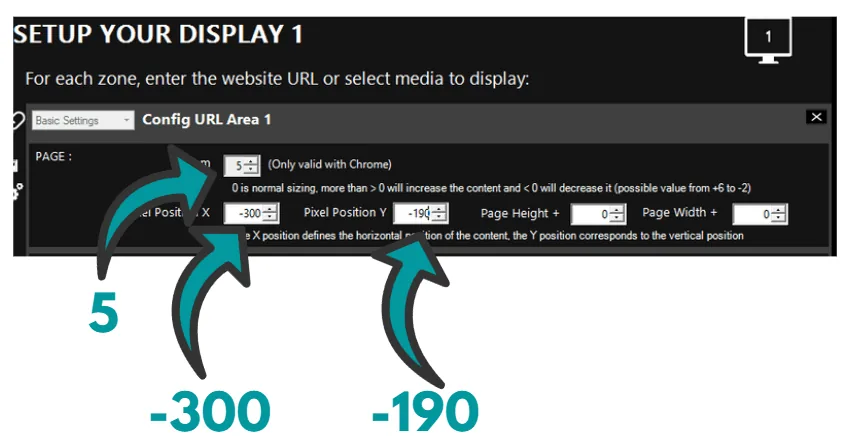
The settings depend on your screen resolution. As an example, a correct framing was obtained with a zoom of 5, an X pixel position of -300 and a Y pixel position of -190. Adjust these values gradually until you get a clean result.
Ready-to-use settings by weather source
To save you time, here are reference values tested for several sources, in 1-zone display (full frame) and 4-zone display (split wall). Use these settings in the web source parameters, then fine-tune according to your resolution.
MSN Weather
URL: https://www.msn.com/fr-fr/meteo
1-zone display:
- Zoom: 4
- X pixel position: 0
- Y pixel position: -240
- Page height +: 0
- Page width: 70
4-zone display:
- Zoom: 1
- X pixel position: 0
- Y pixel position: -245
- Page height +: 0
- Page width: 35
Google Weather
URL: https://www.google.com/search?q=google+m%C3%A9t%C3%A9o
1-zone display:
- Zoom: 5
- X pixel position: -300
- Y pixel position: -180
- Page height +: 0
- Page width: 0
4-zone display:
- Zoom: 2
- X pixel position: -250
- Y pixel position: -180
- Page height +: 0
- Page width: 0
La Chaine Meteo
URL: https://www.lachainemeteo.com/meteo-france/previsions-meteo-france-aujourdhui
1-zone display:
- Zoom: 5
- X pixel position: -50
- Y pixel position: -561
- Page height +: 70
- Page width: 0
4-zone display:
- Zoom: 1
- X pixel position: -20
- Y pixel position: -580
- Page height +: 0
- Page width: 200
Ventusky
URL: https://www.ventusky.com/?p=46.4;4.0;5&l=temperature-2m
1-zone display:
- Zoom: 2
- X pixel position: -40
- Y pixel position: -75
- Page height +: 0
- Page width: 0
4-zone display:
- Zoom: -2
- X pixel position: -20
- Y pixel position: -55
- Page height +: 0
- Page width: 0
Tips for a successful display
These values are starting points: every screen resolution is different, so it is normal to have to slightly retouch the zoom and pixel positions. Change one value at a time to see precisely its effect on the framing. Once the result is satisfactory, save the source in your scenario to find it instantly during your next situations.