Drag & Drop
How do I display promotions and advertisements?
Do you want to broadcast promotions, advertisements or commercial messages on your screens? Easy Multi Display offers several simple methods, suited to non-technical operators. Each one has its advantages depending on whether you want to update your content remotely or display it in a loop.



Broadcast a promotion with Google Slides
Google Slides is ideal if you want to edit your promotion remotely, from any workstation.
- Create your advertisement in Google Slides.
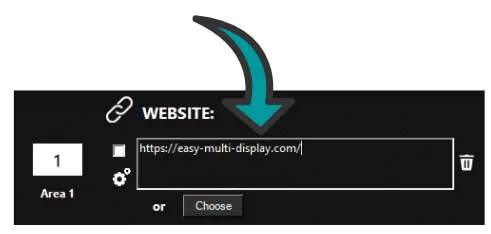
- Copy and paste the address (URL) provided by Google Slides into Easy Multi Display.
- Easy Multi Display shows your slideshow in real time on the video wall.
- Update your slideshow from your computer or mobile: the display updates automatically, with no action needed on the broadcasting PC.
Display a web page
You can display the content of a website directly, for example a promotional page updated online.
- Choose the address (URL) of your site or page.
- Copy and paste this address into Easy Multi Display.
- Set up the display you want: position, zone size and on-screen layout.
Broadcast images and videos
You can design your own promotional visuals and videos yourself, or call on a creative provider.
Easy Multi Display supports displaying a single file or several files broadcast one after another, in a loop. It is the ideal solution for a storefront, a reception area or a point of sale that must run continuously without any action.
Broadcast a promotional video from YouTube
You can also display a promotional video directly from YouTube or another online video platform. Simply enter the video address in Easy Multi Display.
Going further
Also check out our guides on finding royalty-free media, displaying several videos at the same time, and broadcasting streams from different platforms.